You can create email addresses that end in your own domain. Your plan includes a set number of mailboxes, and the Email page shows how many you have used.
Create the address
- Open Email in the left menu. The page shows the domain it is managing.
- Under Create Email Account, type the Mailbox Name. This is the part before the
@. - Type a Password of at least 8 characters, or click Generate. Keep it somewhere safe.
- Leave Mailbox Quota as it is, or change it. 0 means unlimited.
- Click Create Email Account.
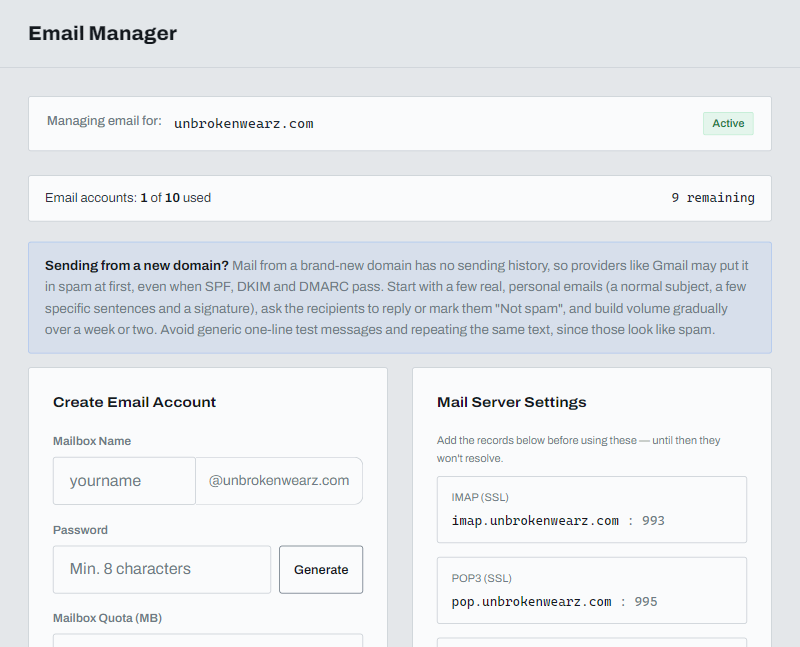
The page says the mailbox is being created and will be ready within a minute.
Webmail and mail apps
- Webmail:
https://webmail.yourdomain/(use your own domain). - IMAP (SSL):
imap.yourdomain, port 993 - POP3 (SSL):
pop.yourdomain, port 995 - SMTP (TLS):
smtp.yourdomain, port 587
DNS records for email
The DNS Records for Email section on the same page lists the records that mail needs and marks each one LIVE once it is found. The mail server names above only work once those records exist. If your DNS is managed somewhere other than with us, add the ones that are missing there. Click Recheck to refresh the status.
Sending from a new domain
Mail from a brand-new domain has no sending history, so providers like Gmail may put it in spam at first. Start with a few real, personal emails, ask people to reply or mark them "Not spam", and build up gradually over a week or two.